.NET MAUI went GA last week 🎉 with the release of Visual Studio 2022 17.3 Preview 1.1 on Windows. Unfortunately updating to this version of Visual Studio breaks development of Xamarin apps for iOS because by default it uninstalls the Xamarin SDKs! 🙈 Fortunately I have a quick fix so you can continue to develop Xamarin.iOS and Xamarin.Forms apps alongside your .NET MAUI apps with Visual Studio 2022 17.3 Preview 1.1. 😁

- Open the Visual Studio Installer and click the Modify button on your Visual Studio 2022 Preview installation.
- On the right-hand side open the .NET Multi-platform App UI node.
- Open the Optional node under .NET MAUI.
- Check the Xamarin SDKs node to install the Xamarin SDKs.
- Click Modify.
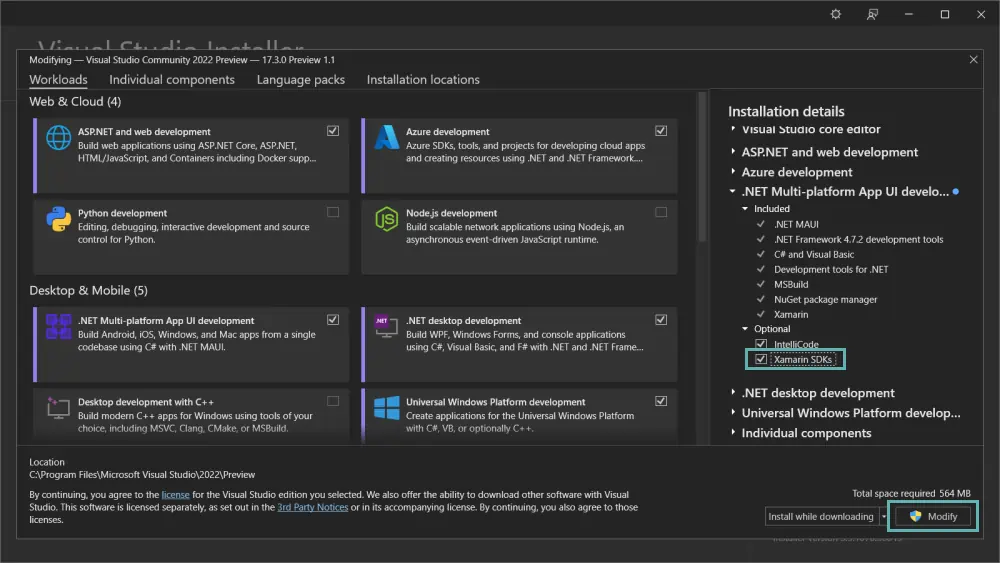
The Visual Studio installer will now download and re-install your missing Xamarin SDKs. 🥳
Cover image includes a background vector created by sentavio from www.freepik.com.
About the author
.NET developer with a passion for mobile and DevOps. I build cross platform apps using Xamarin, backend systems using Azure and GitHub Actions using Docker.
Comments
Join the discussionNo comments yet. Be the first to comment.
Xamarin & .NET MAUI
A collection of articles about developing awesome cross platform apps with Xamarin Forms and .NET MAUI.