Writing a workflow to build a cross platform .NET MAUI app with GitHub Actions is more complicated than the average .NET app. You have to install the .NET MAUI workload and take into consideration which runner can be used to build each platform. In this article I update an earlier workflow to build a cross platform .NET MAUI app for Android, iOS, MacCatalyst and Windows using GitHub Actions, explaining each step.
Introduction
The .NET MAUI app this workflow builds is my demo app MAUI Beach but it should be easily adaptable for any .NET MAUI app.
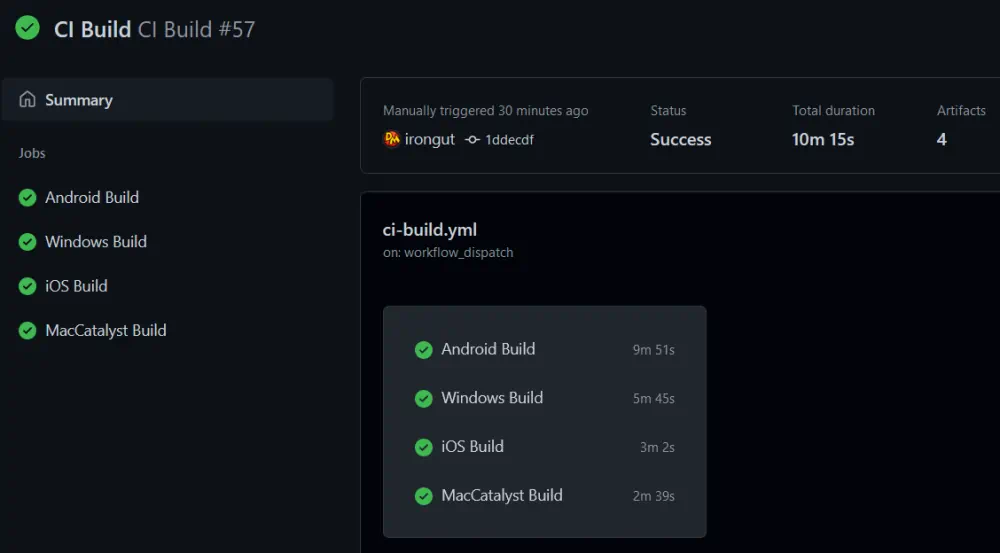
This is a CI build workflow without any testing, signing or deployment steps that will build a .NET MAUI app for Android, iOS, MacCatalyst and Windows in four separate jobs that run in parallel. Each build job will usually take between 3 and 10 minutes to run, Windows and macOS runners are charged at an increased rate so be aware this workflow can eat into your GitHub Actions minutes.
Set up the Workflow
The first part of the workflow is standard stuff for GitHub Actions - set the workflow name, the events it responds to and any environment variables.
name: CI Build

on:
  push:
    branches: [ master ]
    paths-ignore:
      - '**/*.md'
      - '**/*.gitignore'
      - '**/*.gitattributes'
  pull_request:
    branches: [ master ]
  workflow_dispatch:
permissions:
  contents: read

env:
  DOTNET_NOLOGO: true                     # Disable the .NET logo
  DOTNET_SKIP_FIRST_TIME_EXPERIENCE: true # Disable the .NET first time experience
  DOTNET_CLI_TELEMETRY_OPTOUT: true       # Disable sending .NET CLI telemetry
As you can see, this workflow will respond to push and pull request events on the master branch and also has a manual workflow_dispatch trigger. To prevent unnecessary builds, the push event ignores changes that only involve markdown files, .gitignore or .gitattributes.
The environment variables tell the .NET CLI not to show the logo, to skip the first time experience and disable telemetry. This should help improve build times a little.
Android Build Job
# MAUI Android Build
  build-android:
    runs-on: windows-2022
    name: Android Build
    steps:
      - name: Checkout
        uses: actions/checkout@v3

      - name: Setup .NET 6
        uses: actions/setup-dotnet@v2
        with:
          dotnet-version: 6.0.x

      - name: Install MAUI Workload
        run: dotnet workload install maui --ignore-failed-sources

      - name: Restore Dependencies
        run: dotnet restore src/MauiBeach/MauiBeach.csproj

      - name: Build MAUI Android
        run: dotnet publish src/MauiBeach/MauiBeach.csproj -c Release -f net6.0-android --no-restore

      - name: Upload Android Artifact
        uses: actions/upload-artifact@v3.1.0
        with:
          name: mauibeach-android-ci-build
          path: src/MauiBeach/bin/Release/net6.0-android/*Signed.a*
Building a .NET MAUI app for Android can be done on macOS or Windows so this build job uses a Windows runner as they are less expensive than macOS. Visual Studio 2022 is required so we use a windows-2022 runner. The windows-latest runner currently uses the same Windows Server 2022 image so it could be used instead.
The job starts by checking out the code as normal and then installs .NET 6. During preview a pre-release version of .NET 6 was required but since .NET MAUI is now GA we can use the standard release.
In the earlier version of this workflow I installed a distribution of JDK 11 at this point. This is no longer required. 🎉
The .NET MAUI workload is not included in GitHub's windows-2022 runner so it must also be installed. The MAUI workload installs the required workloads for every platform so we only need one install command: dotnet workload install maui
Now we get to the meat of the job - restore dependencies and build the app. We can use a standard dotnet publish command to build our app for Android. The important argument here is -f net6.0-android to set the framework we want to build. I like my CI builds to be release builds so I've used the argument -c Release as well as --no-restore so dependencies are only restored once.
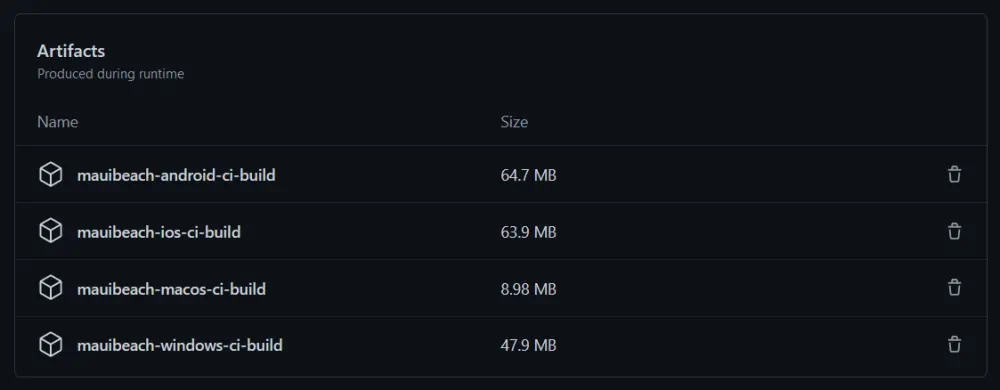
Finally the job uploads the build artifacts, MAUI Beach creates AAB and APK files so both are uploaded.
Windows Build Job
# MAUI Windows Build
  build-windows:
    runs-on: windows-2022
    name: Windows Build
    steps:
      - name: Checkout
        uses: actions/checkout@v3

      - name: Setup .NET 6
        uses: actions/setup-dotnet@v2
        with:
          dotnet-version: 6.0.x

      - name: Install MAUI Workload
        run: dotnet workload install maui --ignore-failed-sources

      - name: Restore Dependencies
        run: dotnet restore src/MauiBeach/MauiBeach.csproj

      - name: Build MAUI Windows
        run: dotnet publish src/MauiBeach/MauiBeach.csproj -c Release -f net6.0-windows10.0.19041.0 --no-restore

      - name: Upload Windows Artifact
        uses: actions/upload-artifact@v3.1.0
        with:
          name: mauibeach-windows-ci-build
          path: src/MauiBeach/bin/Release/net6.0-windows10.0.19041.0/win10-x64/AppPackages/MauiBeach*/MauiBeach*.msix
Building a .NET MAUI app for the Windows platform requires Windows and Visual Studio 2022 so the Windows build job also uses a windows-2022 runner. The windows-latest runner would also work.
The job starts by checking out the code then installs .NET 6 and the .NET MAUI workload just like the Android build job.
During preview we also needed to set up MSBuild but with GA we can now build .NET MAUI apps for Windows with the .NET CLI commands. 🥳
Again I want to create a release build and not restore dependencies during build. We use a standard dotnet publish command to build our .NET MAUI Windows app, to set the framework we want to build we use the -f net6.0-windows10.0.19041.0 argument. The framework must match the Target Framework specified for Windows in the application's project file.
The last step for this job is to upload the Windows app package as a build artifact.
iOS Build Job
# MAUI iOS Build
  build-ios:
    runs-on: macos-12
    name: iOS Build
    steps:
      - name: Checkout
        uses: actions/checkout@v3

      - name: Setup .NET 6
        uses: actions/setup-dotnet@v2
        with:
          dotnet-version: 6.0.x

      - name: Install MAUI Workload
        run: dotnet workload install maui --ignore-failed-sources

      - name: Restore Dependencies
        run: dotnet restore src/MauiBeach/MauiBeach.csproj

      - name: Build MAUI iOS
        run: dotnet build src/MauiBeach/MauiBeach.csproj -c Release -f net6.0-ios --no-restore /p:buildForSimulator=True /p:packageApp=True /p:ArchiveOnBuild=False

      - name: Upload iOS Artifact
        uses: actions/upload-artifact@v3.1.0
        with:
          name: mauibeach-ios-ci-build
          path: src/MauiBeach/bin/Release/net6.0-ios/iossimulator-x64/**/*.app
Building a .NET MAUI iOS app requires macOS, Visual Studio 2022 and Xcode 13.3 so the iOS build job needs to use a macos-12 runner.
⚠ The macos-latest runner currently uses a macOS 11 image so will not work. ⚠
As before, the job starts by checking out the code then installs .NET 6 and the .NET MAUI workload.
Now we can restore our dependencies and build our app. Unlike the other build jobs we can't use dotnet publish for the iOS build job because it signs the app for distribution and fails if a provisioning profile is not present. I don't want to include that in this workflow so use dotnet build instead. To build an iOS app we need the -f net6.0-ios argument to set the framework.
Finally the job uploads the *.app folder as a build artifact.
MacCatalyst Build Job
# MAUI MacCatalyst Build
  build-mac:
    runs-on: macos-12
    name: MacCatalyst Build
    steps:
      - name: Checkout
        uses: actions/checkout@v3

      - name: Setup .NET 6
        uses: actions/setup-dotnet@v2
        with:
          dotnet-version: 6.0.x

      - name: Install MAUI Workload
        run: dotnet workload install maui --ignore-failed-sources

      - name: Restore Dependencies
        run: dotnet restore src/MauiBeach/MauiBeach.csproj

      - name: Build MAUI MacCatalyst
        run: dotnet publish src/MauiBeach/MauiBeach.csproj -c Release -f net6.0-maccatalyst --no-restore -p:BuildIpa=True

      - name: Upload MacCatalyst Artifact
        uses: actions/upload-artifact@v3.1.0
        with:
          name: mauibeach-macos-ci-build
          path: src/MauiBeach/bin/Release/net6.0-maccatalyst/maccatalyst-x64/publish/*.pkg
Building a .NET MAUI app for MacCatalyst requires macOS, Visual Studio 2022 and Xcode 13.3 so the MacCatalyst build job needs to use a macos-12 runner.
⚠ The macos-latest runner currently uses a macOS 11 image so will not work. ⚠
The MacCatalyst build job is very similar to the other build jobs. Using the macos-12 runner it checks out the code then installs .NET 6 and the .NET MAUI workload.
We can use a standard dotnet publish command to build an app for MacCatalyst. For MacCatalyst the framework argument is -f net6.0-maccatalyst and we use the -p:BuildIpa=True argument to create a macOS app package.
The last step uploads the macOS app package as a build artifact.
And Finally...
The complete workflow can be found in my MAUI Beach repo:
👩💻 .github/workflows/ci-build.yml
And, you can see the workflow runs here. 🏗
If I had tests for this app they would be run as an extra step in each job between the build step and uploading the build artifacts.
This workflow could be expanded to create a CD workflow that releases a .NET MAUI app on each platform. This requires the relevant certificate, provisioning profile or keystore for each platform, which should be saved as secrets in GitHub and then copied to the runner before the build step. For Android a signing step is added after the build step but for the other platforms this is handled by the dotnet publish command. The process should be similar to that for Xamarin.Forms and you can find more information here.
Cover image includes a vector created by brgfx from www.freepik.com.
About the author
.NET developer with a passion for mobile and DevOps. I build cross platform apps using Xamarin, backend systems using Azure and GitHub Actions using Docker.
Comments
Join the discussionNo comments yet. Be the first to comment.
GitHub Actions
A collection of articles about GitHub Actions. From automating your first workflow to publishing your own Actions on the Marketplace.